

Say hello to ReviewScribe. It’s a WooCommerce review plugin (and a WordPress review plugin for sites without a store), and it helps with the whole review job: getting more customer reviews, keeping them genuine, showing them where shoppers decide, and seeing what customers are really telling you.
It all happens inside WordPress. No code, and no sending your reviews to someone else’s server.
We made it for small online stores, for agencies that look after lots of WooCommerce sites, and for any WordPress site that just wants testimonials. The free plugin is on WordPress.org now. Come take the tour: why we made it, what it does, and what you get for free.
Why reviews matter
Picture a shopper looking at a $28 ceramic mug. Will it chip? Is the glaze really that colour? Your product page says yes. But they want to hear it from someone who’s already bought one.
That’s not just a hunch. The research says the same thing.
270%
A product with five reviews is 270% more likely to be bought than a product with no reviews.
Source: Spiegel Research Center, Northwestern University (2017)
99.75%
of US shoppers read reviews at least some of the time before they buy.
Source: PowerReviews, survey of 8,153 shoppers (2023)
Reviews help with search too. Every new review adds fresh, real words about your product to the page.
Why we built ReviewScribe
We’ve spent a lot of time on WooCommerce stores, and we kept running into the same three problems.

WooCommerce reviews stop at a basic form
WooCommerce gives you a review form at the bottom of the product page, and that’s about it. It won’t ask customers for a review. It won’t take photos or videos. And it won’t tell you much about what people think.
Three tools for one job
So stores bolt on more tools. A testimonial widget here, a review email service there, another dashboard for the numbers. That’s more monthly bills, more logins, and tools that don’t share data.
Your reviews should stay yours
Many of those services keep your reviews on their servers. Stop paying, and you can lose reviews your own customers wrote for you. We think that’s backwards. ReviewScribe runs inside WordPress, saves reviews in your own database, and lets you export them whenever you like.
Meet ReviewScribe: four jobs in one plugin
ReviewScribe does the whole review job in one place. It collects reviews from your store, your own review forms and imports. It helps you manage them in one dashboard, with moderation and spam protection. It showcases them on product pages and anywhere else on your site. And it analyzes your ratings, review trends and review emails, so you can see what’s working.

It comes in two parts. The free plugin from WordPress.org does a lot on its own. ReviewScribe Pro is an add-on you install next to it with a licence key. As we go, we’ll point out which parts need Pro.
Collect more reviews from every channel
Getting more reviews comes down to two things: make it easy to leave one, and ask at the right moment. ReviewScribe helps with both.
The channels reviews come from
- WooCommerce product pages: a better product review form under every product.
- Custom review forms: on any page of your site, with or without WooCommerce.
- Review request emails (Pro): sent after each order, with a star rating right in the email.
- Manual entries: kind words a customer sent by email or told you in person.
- CSV import: the reviews you already have, from another plugin or service.
- Google and Facebook: connect your business profiles and show those reviews next to your own, free.
- Trustpilot (Pro): bring in your Trustpilot reviews the same way.
- WordPress.org (Pro): your plugin’s reviews, if you sell a WordPress plugin.
Whatever the channel, every review lands in the same list. CSV imports keep the details too: names, ratings, titles, text, dates, products, verified status, countries, photos and videos.

Custom forms bend to fit. Pick stars, numbers, emoji or thumbs up and down, add fields like the reviewer’s job title, and switch on built-in Google reCAPTCHA to keep spam out.
Richer reviews
A photo from a real customer beats the nicest product shot. With ReviewScribe Pro, customers can add photos, videos and YouTube links to their reviews. They can also say whether they’d recommend the product, rate things like quality and delivery separately (multi-criteria ratings), and review anonymously if they’d rather.

Automated review request emails
Most happy customers never leave a review. Not because they don’t want to, but because nobody asked. ReviewScribe Pro does the asking for you.

When an order reaches the status you pick, a review request goes out. Refunded and cancelled orders are skipped. You set the timing by product or category, say 14 days for skincare and 7 for electronics, so people have had time to try what they bought.
The email looks like your store. You choose the sender name, logo, banner, subject, heading, text, signature and button, then check it with a preview and a test send. Variables fill in the customer’s name, order number and store name. And customers can start their review right in the email by tapping a star.
The fiddly parts are handled too. Emails go out in the customer’s language (picked from their billing country, browser or your store’s locale, with a fallback), only during your sending hours, through your own SMTP settings. Every email has an unsubscribe link, and opens and clicks are tracked.
How smart follow-ups react
- Didn’t open the email? It’s sent again with a different subject line.
- Opened but didn’t click? A gentle reminder goes out.
- Clicked but didn’t review? A follow-up nudges them to finish.
- Reviewed, unsubscribed, refunded or cancelled? The emails stop. You also set the most follow-ups anyone can get.

Manage every review from one dashboard
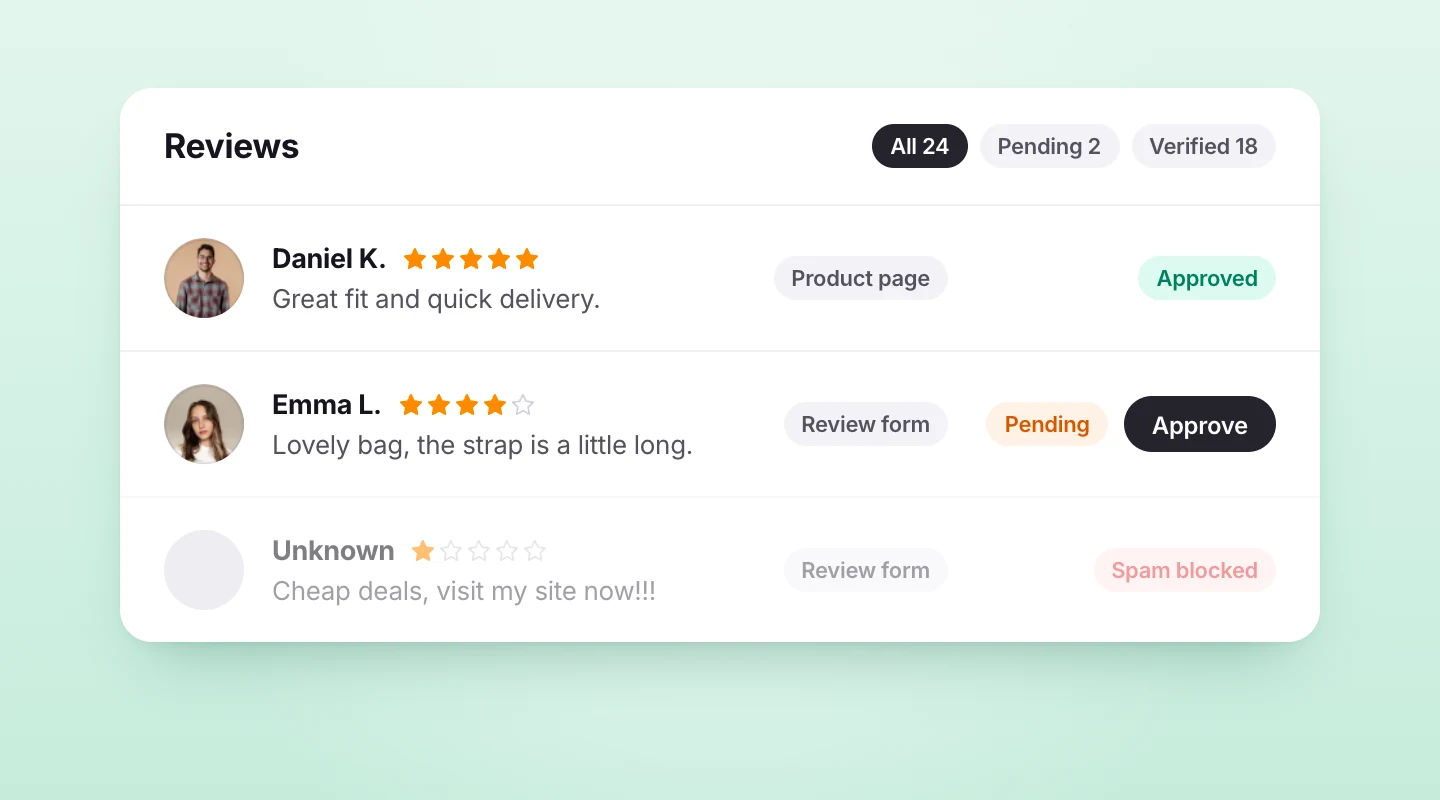
Review management happens in one place. Product reviews, form submissions, imports and manual entries all land in one list. Sort and filter by product, rating, source or status. Approve the good ones, hold anything odd, and keep the queue tidy.
Trust tools, all in the free plugin
Reviews only work if shoppers believe them, so the tools that protect them are free. New reviews can wait for your approval, following your WordPress moderation settings. Reviews from real buyers get a Verified purchase badge. reCAPTCHA guards the product review form and your custom forms. And shoppers can mark a review Helpful or Report it, with one vote per visitor.
You also decide who can submit, edit, delete, report and vote on reviews, when an order becomes eligible to review, and how many reviews each customer can leave.
Showcase reviews where shoppers decide
Reviews only help if people see them. ReviewScribe puts them on your product pages, around the rest of your site, and in Google.
The product review widget
This swaps WooCommerce’s plain review list for a proper review section. The free plugin gives you the rating summary and star breakdown, a Write a review button, sorting and a star filter, Helpful and Report buttons, and verified purchase badges. You choose how reviews are displayed and how many show per page.

Pro adds the extras shoppers love: a customer photo gallery, an AI review summary, a recommendation score, media thumbnails, and the variant each reviewer bought, like size or colour. You also get country flags, a Not helpful button, “with photos” and “verified purchase” filters, and your own colours and texts, or a style that inherits your theme.
Showcase widgets for any page
Four free widgets turn your reviews into social proof anywhere on your site. The review carousel is a responsive slider for your homepage, landing pages and product pages. The video carousel does the same with customer videos (collected with Pro’s video reviews). The review grid lays out reviews and photos in tidy rows. And the floating review badge is a small trust badge that follows visitors around the site.

Every widget setting is free: design templates and layouts, avatars, country flags, review titles, verified badges, auto-slide and direction, slide navigation, pagination, sorting, star and source filters, and colours. The floating badge can be limited to certain pages, placed where you want and hidden on mobile.
Add any widget with a Gutenberg block, an Elementor widget or a shortcode. They work with WooCommerce block themes and can inherit your theme’s style.
Star ratings in Google
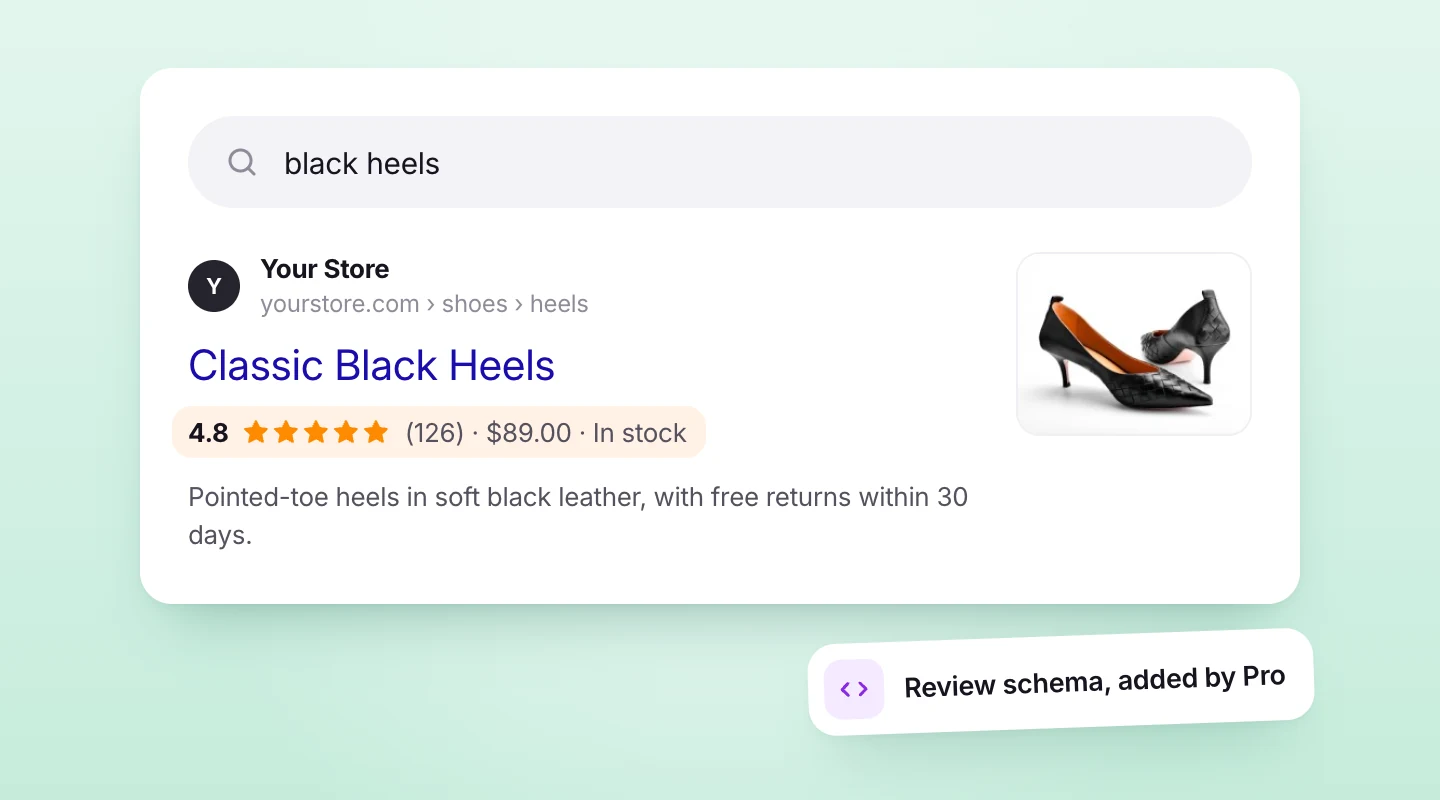
Those little stars under a search result catch the eye. Pro adds Google review schema (Product AggregateRating and Review JSON-LD), which makes your product pages eligible for them. Google decides whether to show the stars, but without the markup there’s no chance.
Review and email analytics
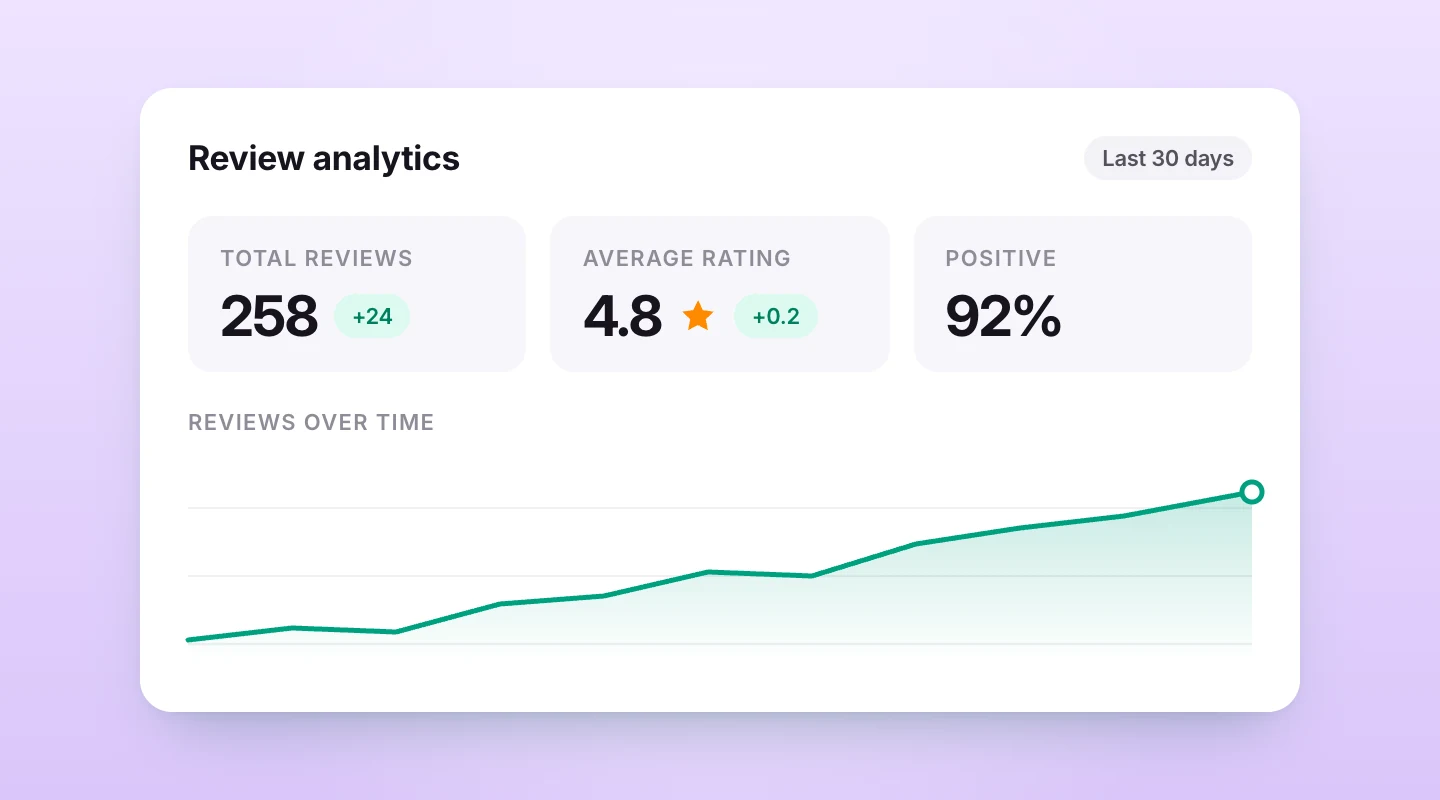
Want to know how you’re doing? The free plugin shows your total reviews and average rating compared with the previous period, positive versus negative reviews, the rating breakdown, reviews by type, and your latest reviews.
What ReviewScribe Pro adds
Pro shows how your review emails are doing: how many were sent, opened, clicked and turned into reviews, as numbers and conversion rates. That way you can see which campaigns and follow-ups bring reviews in, and which step loses people.
It also adds cards for reviews by source, ratings by product category and your top products. And AI review summaries sum up what customers love and what they’d change.
What it looks like for one order
- Day 0: Maya orders a pair of running shoes. The order is marked completed.
- Day 5: She gets a short email asking how they fit, with five stars she can tap.
- Day 5, a minute later: She taps four stars, writes two lines about the sizing, and adds a photo after her first run.
- Day 6: You approve it. It shows on the product page with a verified purchase badge, and in the carousel on your homepage.
No more reminders go out, because she’s already reviewed. (Emails and photo reviews are Pro features.)
Your data, on your site
Your reviews live in your WordPress database, not ours. Import and export are free, so they can move in or out whenever you like. The free plugin never contacts reviewscribe.com. Only Pro checks in, to verify its licence.
There’s no review gating either. Everyone who leaves a review goes to the same place afterwards, whatever rating they gave.
A few outside services come in only when you switch on the feature that needs them. Google reCAPTCHA loads once you add your own site and secret keys. Reviewer pictures in the product review list come from Gravatar. And AI summaries go from your site to OpenAI, with your own key.
Who ReviewScribe is for
ReviewScribe fits three kinds of WordPress sites.
WooCommerce stores
Small and growing stores that want more product reviews without emailing every customer by hand, and nicer-looking reviews on every product page.
Agencies
If you build and look after lots of WooCommerce sites, one Agency licence covers unlimited sites. Every client gets the same review setup, with no extra fee per site.
WordPress sites without a store
Coaches, clinics, SaaS teams and service businesses can collect testimonials with a custom review form and show them in a carousel, grid or badge. No WooCommerce needed.
Try it on your own store
The free version installs from WordPress.org in a minute. No licence key, no trial clock.
Free vs Pro at a glance
| Feature | Free | Pro |
|---|---|---|
| Product review widget: summary, Write a review, sorting, star filter, Helpful and Report, verified badge | Yes | Yes |
| Product review form and custom review forms with reCAPTCHA | Yes | Yes |
| Moderation, manual reviews, import and export | Yes | Yes |
| Reviews from Google and Facebook | Yes | Yes |
| Rating types: stars, numbers, emoji, thumbs | Yes | Yes |
| Review permissions and eligibility | Yes | Yes |
| Carousel, video carousel, grid and floating badge, with all their settings | Yes | Yes |
| Gutenberg blocks, Elementor widgets and shortcodes | Yes | Yes |
| Core review analytics | Yes | Yes |
| Photo, video and YouTube reviews, recommendations, anonymous and multi-criteria ratings | No | Yes |
| Image gallery, AI summaries, recommendation score, variant details on product pages | No | Yes |
| Product widget colours and texts, inherit theme styles | No | Yes |
| Reviews from Trustpilot and WordPress.org | No | Yes |
| Review request emails, smart timing, smart follow-ups, in-email rating | No | Yes |
| Email analytics and advanced analytics cards | No | Yes |
| Google review schema | No | Yes |
| Priority support | No | Yes |
Pricing
The free plugin needs no licence, and it isn’t a trial. All Pro plans have the same features. They only differ in how many sites they cover: Pro is 1 site, Plus is 5 and Agency is unlimited. Plans are billed yearly and come with a 14-day money-back guarantee.
Until December 31, early-bird prices are up to 50% off: Pro is $49 a year instead of $89, Plus $99 instead of $179, and Agency $199 instead of $399.
How to get started
Here’s the quickest way in.
- Check the basics: WordPress 5.9 or later, and WooCommerce installed and active if you want product reviews.
- In WordPress, go to Plugins → Add New Plugin, search for “ReviewScribe”, then install and activate it.
- Open ReviewScribe in the admin menu and set up the product review widget.
- Create a review form and turn on reCAPTCHA.
- Import the reviews you already have from a CSV file.
- Add a carousel or floating badge with a block, Elementor widget or shortcode.
- With Pro, turn on review request emails and set the timing for each category.

The quickstart guide walks you through each step, and the live demo lets you click around first. For a closer look, see ReviewScribe for WooCommerce, Collect & Showcase and Analytics.
Early bird: up to 50% off your first year, until December 31, 2026
Start collecting more reviews today
Install the free plugin from WordPress.org, or pick a paid plan to put review emails, follow-ups and AI summaries on autopilot.
Paid plans from
$49/year
Frequently asked questions
Is ReviewScribe free?
Yes. The free plugin on WordPress.org includes the product review widget, product and custom review forms with reCAPTCHA, Google and Facebook reviews, moderation, manual reviews, CSV import and export, four showcase widgets and core review analytics. It needs no licence key.
What does ReviewScribe Pro add?
Automated review request emails with smart timing and follow-ups, Trustpilot and WordPress.org reviews, photo, video and YouTube reviews, AI review summaries, Google review schema, product widget extras and advanced analytics. Pro is an add-on you install next to the free plugin.
Does ReviewScribe work without WooCommerce?
Yes. Custom review forms, imports and the showcase widgets work on any WordPress site. Product reviews and review request emails after orders need WooCommerce.
Can I show my Google, Facebook or Trustpilot reviews?
Yes. Google and Facebook connections are free, and Trustpilot comes with ReviewScribe Pro. Those reviews show up next to your own, in any widget. For other sites, import the reviews from a CSV file.
Where are my reviews stored?
In your own WordPress database. You can export them any time, and the free plugin doesn’t send anything to reviewscribe.com.
Does WooCommerce send review request emails on its own?
No. WooCommerce has a review form, but it doesn’t email customers to ask for reviews. ReviewScribe Pro sends the requests and follow-ups for you.
What do I need for AI review summaries?
ReviewScribe Pro and your own OpenAI API key. Only the review text is sent from your site to OpenAI to write the summary.
Got a question we didn’t answer? Send us a message. We read every one.

Leave a Reply